Apache Parquet Explained: How It Makes Your Queries 100× Faster
The File Format That Makes Data Engineers Smile: Apache Parquet Explained

You’ve opened a CSV before. Rows of data. Comma separated. Human-readable. Totally fine.
Now imagine 500 million rows. You need just one thing — everyone’s age. What happens?
Your computer reads every single row. Every name. Every email. Every city. Every job title. All 500 million records — just to get the one column you asked for.
That’s like going to a library, reading every page of every book, just to find one sentence.
Parquet was built to fix exactly this. Let’s break it down so simply that you could explain it to your mum.
Row vs Column Storage
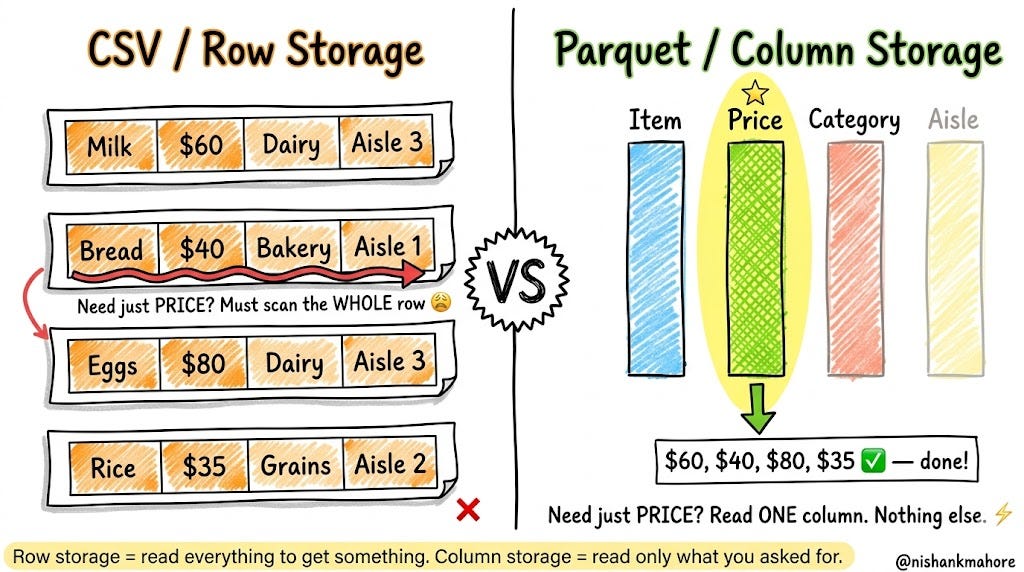
Imagine a supermarket receipt. Every item on your receipt is one row:
[Milk  | $60  | Dairy   | Aisle 3]
[Bread | $40  | Bakery  | Aisle 1]
[Eggs  | $80  | Dairy   | Aisle 3]
This is how CSV and databases store data — everything about one thing, all together on one line.
Now imagine you’re the supermarket manager. You only want to know: “What’s the total price of everything sold today?”You don’t care about the aisle numbers. You don’t care about the categories. Just prices.
But with a CSV? You still have to scan every column of every row to get those prices. You’re dragging useless information along for the ride.
Parquet flips the whole idea. Instead of storing by rows, it stores by columns:
Prices:     [$60, $40, $80, $35...]
Items:      [Milk, Bread, Eggs, Rice...]
Categories: [Dairy, Bakery, Dairy, Grains...]
Aisles:     [3, 1, 3, 2...]
Now want just prices? Read one block. Done. Nothing else touched. That’s the whole superpower.
What Is Parquet? Think of It as a Very Smart Filing Cabinet
Parquet is just a file format — a way of organising data inside a file on your hard disk or cloud storage. It’s not a database. It’s not software you run. It’s just a smarter way of packing data into a file.
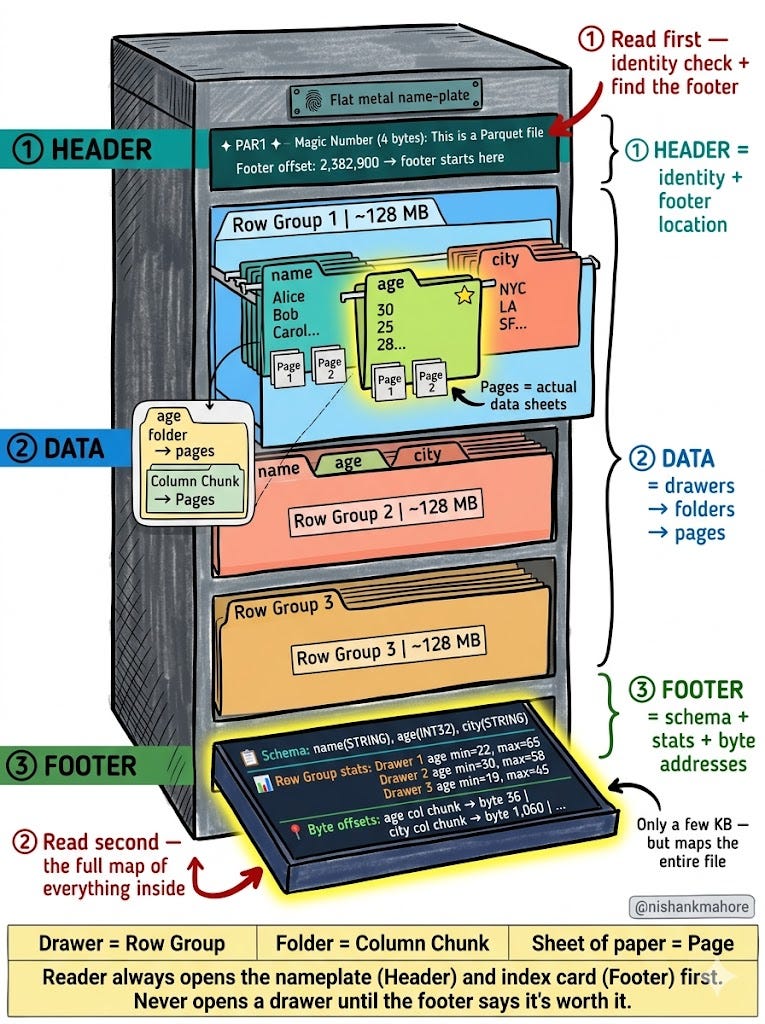
Every Parquet file is divided into exactly three sections:
1. Header — the very first bytes of the file. Contains the magic number PAR1 (proves this is a valid Parquet file) and a footer offset (tells the reader exactly where the footer starts so it can jump straight to it without scanning).
2. Data — the bulk of the file. Split into drawers (Row Groups), and inside each drawer, folders (Column Chunks), and inside each folder, pages (the actual data).
3. Footer — at the very end. The master index of everything in the file — schema, stats, byte offsets for every column chunk and page. The reader reads this first before touching any data.
Think of it like a filing cabinet:
The sign on top of the cabinet = Header (what is this cabinet? where’s the index?)
The drawers = Row Groups (horizontal slices of data)
The folders inside each drawer = Column Chunks (one per column)
The sheets of paper in each folder = Pages (the actual values)
The index card tray at the bottom = Footer (the master map)
Used by: Apache Spark, AWS Athena, Google BigQuery, Snowflake, DuckDB, Apache Iceberg — basically every modern data tool on the planet.
Row Groups — The Drawers
Remember the filing cabinet? You’re about to open it for the first time.
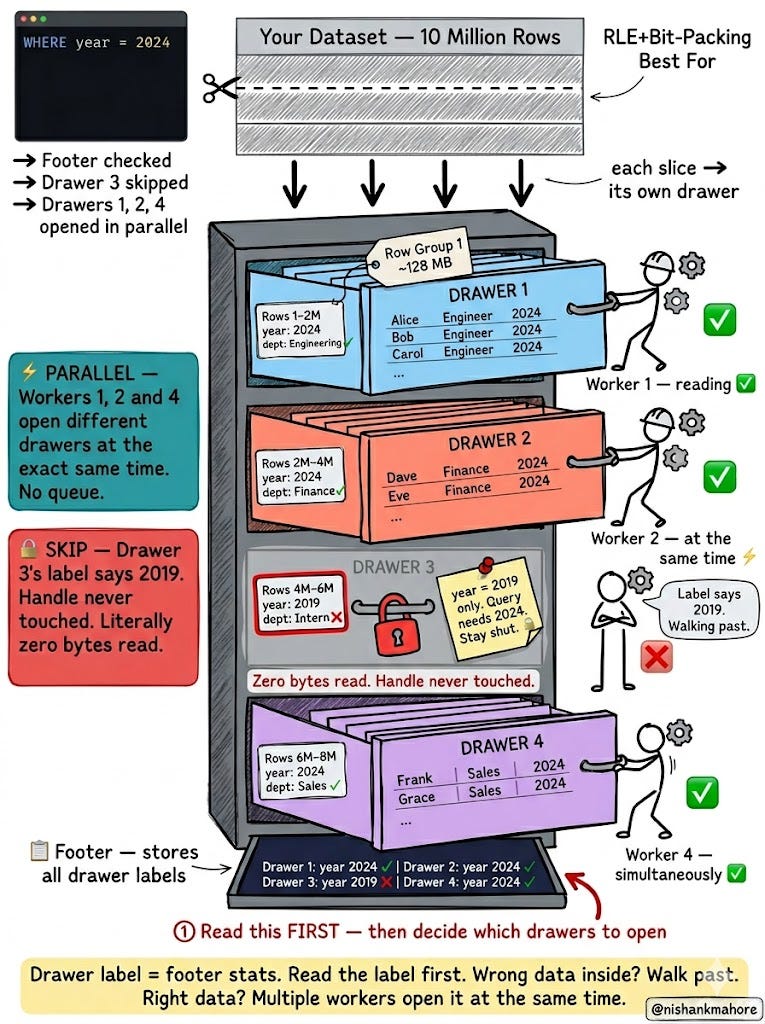
Your 10 million rows don’t all go into one massive open pile. Parquet cuts them into horizontal slices and slides each slice into its own drawer. Each drawer is one Row Group — about 128 MB, roughly 1–2 million rows per drawer.
Simple rule: every row lives in exactly one drawer. Every drawer has all the columns for those rows.
Drawer 1  →  rows 1 to 2 million
Drawer 2  →  rows 2 to 4 million
Drawer 3  →  rows 4 to 6 million
Drawer 4  →  rows 6 to 8 million
Now here’s where it gets smart.
Each drawer has a label stuck to the front. That label shows the minimum and maximum values of each column inside — written right there on the face of the drawer, without opening it:
Drawer 1  →  year: 2024   dept: Engineering
Drawer 2  →  year: 2024   dept: Finance–Marketing
Drawer 3  →  year: 2019   dept: Intern          ← wrong year
Drawer 4  →  year: 2024   dept: Sales
Your query says WHERE year = 2024. You read Drawer 3’s label. It says 2019. You walk straight past it. Handle never touched. Not one byte read from inside. That’s predicate pushdown — and it’s why Parquet can skip 70–90% of your data before doing any real work.
And because every drawer is independent, multiple workers can yank open different drawers at the same time. No waiting in line.
Column Chunks — The Folders Inside Each Drawer
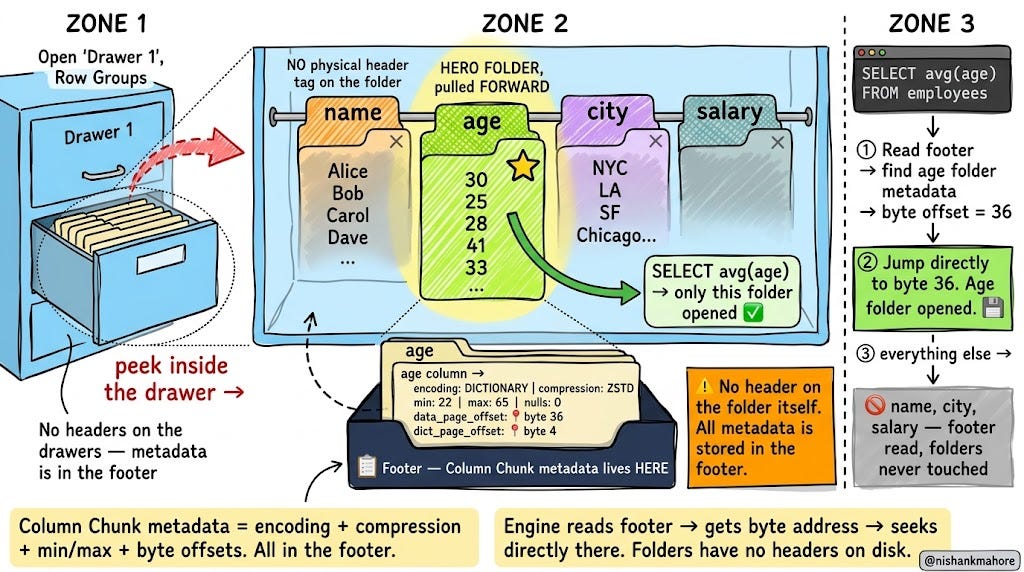
Now zoom into one open drawer. Even though it holds a horizontal slice of rows, inside it, data is organised by column.
So if your data has three columns — name, age, city — inside Drawer 1 you’ll find three neat colour-coded folders hanging side by side:
Orange folder: all the names from rows 1 to 2 million
Green folder: all the ages from rows 1 to 2 million
Purple folder: all the cities from rows 1 to 2 million
These folders are called Column Chunks.
Important: Column Chunks also have no physical header written on disk.
Just like the drawers, there’s no label physically attached to each folder on disk. The metadata about each folder — which encoding was used, which compression, min/max values, how many nulls, and most importantly the exact byte addresswhere the folder starts on disk — all lives in the footer.
Footer says about the "age" folder in Drawer 1:
  ├── encoding:           DICTIONARY
  ├── compression:        ZSTD
  ├── min value:          22
  ├── max value:          65
  ├── null count:         0
  ├── num values:         2,000,000
  ├── data_page_offset:   📍 byte 36      ← jump here for data
  ├── dict_page_offset:   📍 byte 4       ← jump here for dictionary
  └── index_page_offset:  📍 byte 2,048   ← jump here for page index
When your query says SELECT age, the engine reads the footer, finds the age folder’s metadata, grabs the byte offset, and jumps directly to that folder on disk. The name and city folders sit completely untouched.
That’s why reading 1 column out of 50 is almost as fast as reading a file with only 1 column.
Pages — The Smallest Unit (Think: Pages Inside a Folder)
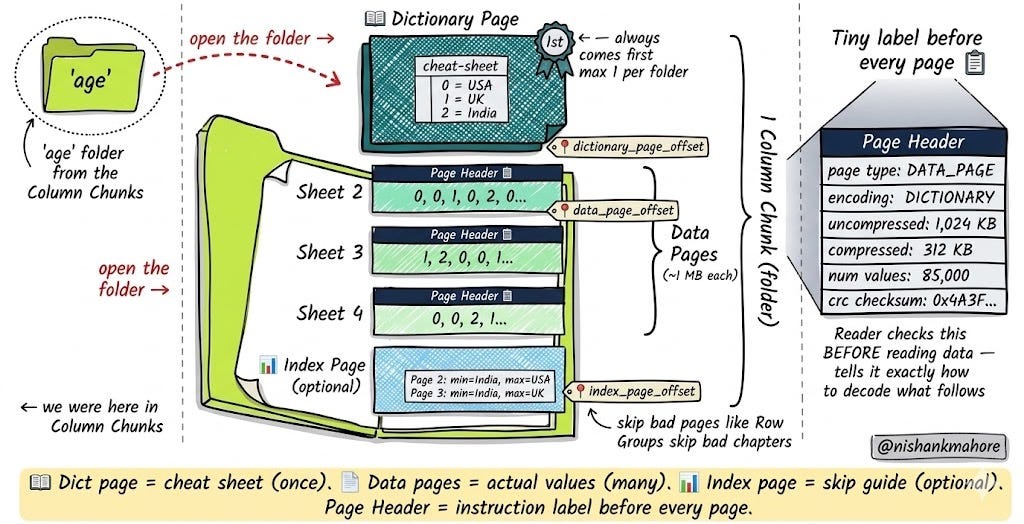
Zoom in one more level. Each folder (Column Chunk) is split into individual pages — each about 1 MB. Think of these as the actual sheets of paper stacked inside the folder.
There are three kinds of pages, each with a job:
Dictionary Page — the cheat sheet clipped to the front. If your column has repeated values like “USA” appearing a million times, this page stores the unique list once: {0: USA, 1: UK, 2: India}. Everything else uses numbers instead of words. Always the first sheet in the folder. Maximum one per folder.
Data Pages — the actual value sheets. But here’s the key: every single data page has a small header stuck to the top of it — like a sticky note attached before the data begins. This page header says:
Page Header:
  ├── page type:         DATA_PAGE
  ├── encoding:          DICTIONARY
  ├── compressed size:   312 KB
  ├── uncompressed size: 1,024 KB
  ├── num values:        85,000
  └── checksum (crc):    0x4A3F...
The reader always checks this header before reading the page data. It’s the decoder’s instruction sheet. Without it, the reader wouldn’t know how big the page is, how it’s encoded, or how to decode what follows.
Index Page — an optional back-of-folder index. Stores the min and max value inside each data page so the engine can skip individual pages too — not just entire drawers.
Encoding — Making Data Smaller Before Compressing
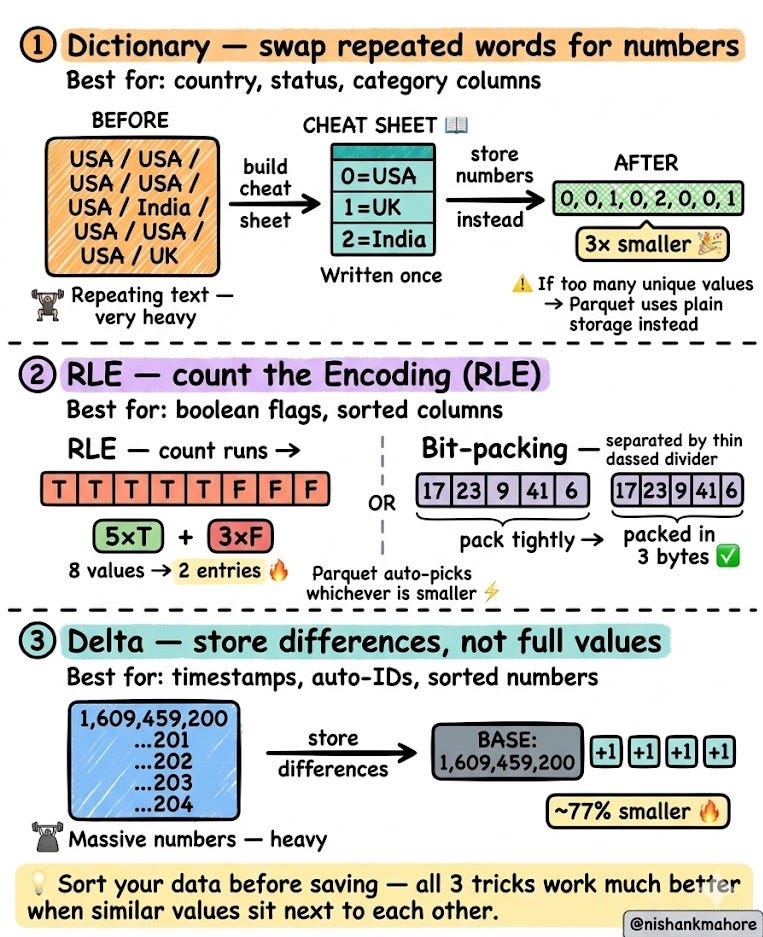
Before Parquet saves data to disk it does something clever — it re-encodes it. Think of encoding as packing your suitcase smartly before putting it in the overhead bin.
There are three main tricks:
Trick 1 — Dictionary Encoding (for repeated values)
You have a column with 5 million rows, but only 3 unique countries: USA, UK, India.
Instead of writing “USA” 3 million times, Parquet writes a cheat sheet once:
{ 0: USA, 1: UK, 2: India }Then stores just numbers in the data:
0, 0, 1, 0, 2, 0, 0, 0, 1...Full country names replaced by tiny integers. 3× smaller instantly.
Trick 2 — Run-Length Encoding (for long streaks)
You have a column that goes TRUE TRUE TRUE TRUE TRUE FALSE FALSE FALSE.
Instead of storing all 8 values separately, Parquet stores:
5 × TRUE, 3 × FALSE8 values become 2 entries. Parquet is smart enough to auto-switch to a related trick called bit-packing for dense non-repeating data — it picks whichever is smaller automatically.
Trick 3 — Delta Encoding (for sequential numbers)
You have timestamps that go up by 1 second each row. Instead of storing huge numbers:
1,609,459,200 → 1,609,459,201 → 1,609,459,202...Parquet stores just the first value, then the tiny differences:
BASE: 1,609,459,200 then +1, +1, +1, +1...Huge numbers become one number and a bunch of +1s. Great for timestamps and auto-incrementing IDs.
Compression — The Final Zip
After encoding reorganises data into uniform patterns, Parquet applies a compression algorithm — like zipping a file, but smarter.
The reason encoded Parquet compresses so much better than raw CSV isn’t magic. It’s because:
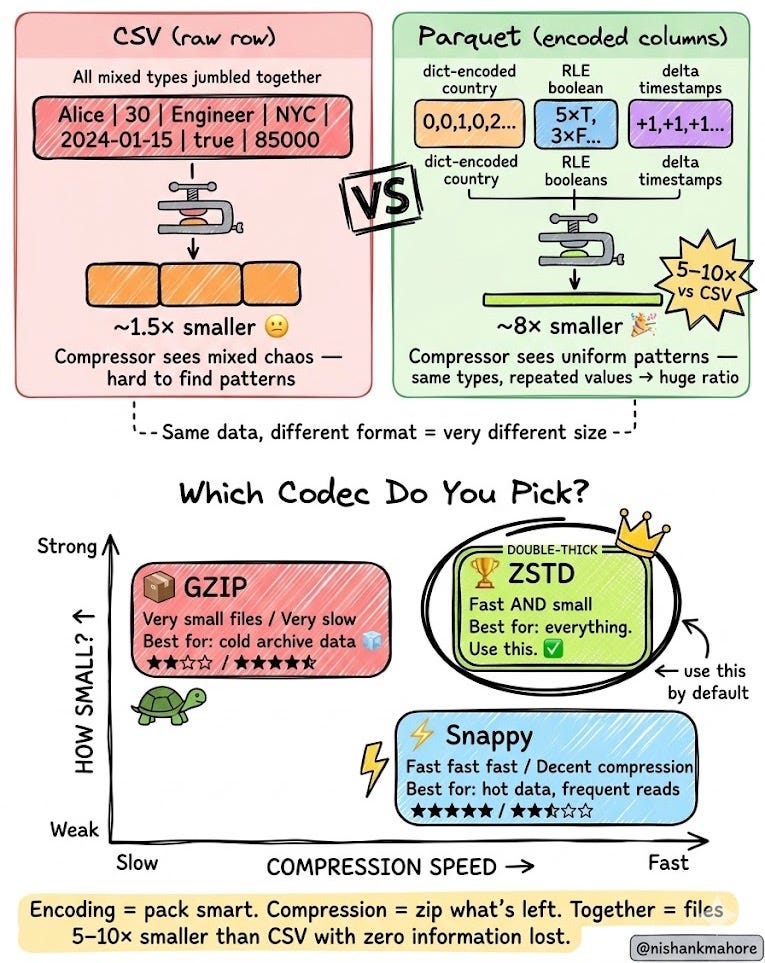
A CSV row has mixed types jumbled together — hard to compress
A Parquet column after encoding has repeating patterns of the same type — easy to compress
This is why Parquet files are typically 5–10× smaller than the same data in CSV.
Three codecs to choose from:
Snappy ⚡ — very fast to compress and decompress. Good compression. Use for hot data you read constantly.
GZIP 📦 — best compression (smallest files). Slow. Use for cold data you rarely touch.
ZSTD 🏆 — fast AND great compression. The modern default. Use this unless you have a specific reason not to.
The Magic Number, Header & Footer — How Parquet Knows What It Is
Every Parquet file has three distinct structural sections. Most tutorials only talk about two. Let’s cover all three correctly.
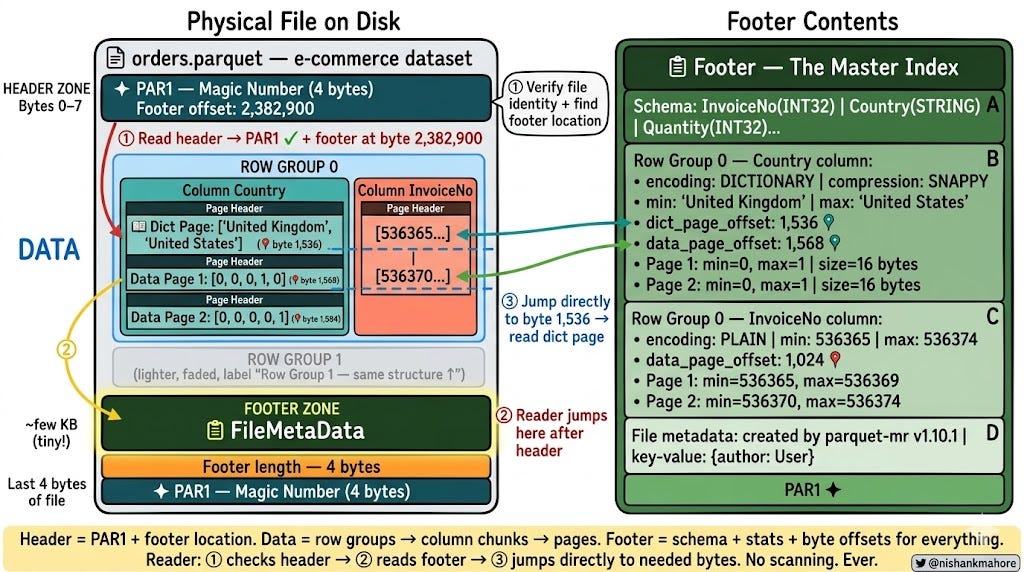
① The File Header — “I Am Parquet, Find My Map Here”
The very first bytes of every Parquet file form the header. It contains exactly two things:
The magic number PAR1 — 4 bytes at the start of the file. Any reader checks this first. If it’s missing or corrupted, the file is rejected immediately. It’s the file’s identity stamp.
The footer offset — a number telling the reader exactly how many bytes from the start of the file the footer begins. This means the reader never has to scan through the data section to find the footer. It jumps directly.
Header:
  ├── PAR1                    ← 4 bytes: "I am Parquet"
  └── Footer offset: 2,382,900  ← "Footer starts at byte 2,382,900"
Think of the header like the sign on top of the filing cabinet: it tells you what the cabinet is and where the index card tray is, before you even open a drawer.
② The Page Header — A Label Before Every Page of Data
Inside every folder (Column Chunk), before every single sheet of paper (Page), there is a small physical page headerwritten on disk. This is the only level where a header exists physically on disk — Row Groups and Column Chunks have no on-disk headers; their metadata lives in the footer.
The page header tells the reader, before it reads a single data byte:
Page Header:
  ├── page_type:         DATA_PAGE
  ├── encoding:          DICTIONARY
  ├── compressed_size:   312 KB
  ├── uncompressed_size: 1,024 KB
  ├── num_values:        85,000
  └── crc_checksum:      0x4A3F...
Without this, the reader has no idea how big the page is, how it’s encoded, or how to decode what follows.
③ The File Footer — The Master Index Card
At the very end of the file (just before the closing PAR1) is the File Footer — a small block of a few KB that is the most important part of the whole file.
It stores everything the reader needs to plan a query without touching a single data byte:
Schema — every column name and type. The file is self-describing — no external schema registry needed.
Row Group metadata — for every drawer: how many rows, total byte size, and for every folder inside: min/max values, null count, encoding, compression codec, and three byte offsets pointing exactly to:
data_page_offset— where the first data page startsdictionary_page_offset— where the dictionary page is (if one exists)index_page_offset— where the page-level index is (if enabled)
File metadata — schema, created-by info, custom key-value properties added by Spark, Pandas, or your tool.
How the engine reads a file — step by step:
① Read header → verify PAR1 + get footer offset
② Jump to footer offset → read entire footer (just a few KB)
③ Check Row Group stats → skip drawers that can't match the query
④ Find byte offset for needed Column Chunks → jump directly there
⑤ Read page headers → decode only needed pages
Five steps. No scanning. The header and footer do all the navigation work.
Here’s what this looks like with real data — an e-commerce dataset with 8 columns:
Header:
  PAR1 | Footer starts at byte: 2,382,900

Row Group 1:
  Column Chunk (InvoiceNo):
    Page 1: [536365, 536366, 536367, 536368, 536369]
    Page 2: [536370, 536371, 536372, 536373, 536374]
  Column Chunk (Quantity):
    Page 1: [6, 6, 6, 8, 6]
    Page 2: [4, 8, 16, 4, 7]
  Column Chunk (Country):  ← dictionary encoded
    Dictionary Page: ['United Kingdom', 'United States']
    Data Page 1: [0, 0, 0, 1, 0]  ← just tiny integers!
    Data Page 2: [0, 0, 0, 0, 1]

Footer:
  Row Group 1 metadata:
    InvoiceNo → offset: 1024 | size: 256 | min: 536365 | max: 536374
    Country   → dict_offset: 1536 | data_offset: 1568 | encoding: DICTIONARY
  Schema: InvoiceNo (INT32), Quantity (INT32), Country (DICT STRING)...
  PAR1
Notice: Country column stores “United Kingdom” and “United States” once in the dictionary page, then just uses 0 and 1as indices in data pages. Dictionary encoding in action on real data.
Here's what this looks like with real data — an employee dataset with 6 columns (name, age, dept, salary, city, year):
|----------------------- Parquet File --------------------------------|
|                                                                     |
|  Header                                                             |
|  - Magic Number (PAR1)                                              |
|  - Footer Length (offset to footer start): 2,382,900                |
|                                                                     |
|---------------------- Row Groups ---------------------------------- |
|  Row Group 1  (rows 1–5)                                            |
|   - Column Chunk (name)                                             |
|       - Page 1 ['Alice', 'Bob', 'Carol', 'Dave', 'Eve']             |
|       - Page 2 ['Frank', 'Grace', 'Henry', 'Iris', 'Jay']           |
|   - Column Chunk (age)                                              |
|       - Page 1 [30, 25, 28, 41, 33]                                 |
|       - Page 2 [29, 45, 37, 22, 50]                                 |
|   - Column Chunk (salary)                                           |
|       - Page 1 [85000, 72000, 91000, 68000, 95000]                  |
|       - Page 2 [78000, 102000, 65000, 55000, 110000]                |
|   - Column Chunk (city)                                             |
|       - Page 1 ['NYC', 'LA', 'SF', 'Chicago', 'NYC']                |
|       - Page 2 ['SF', 'Boston', 'Dallas', 'LA', 'NYC']              |
|   - Column Chunk (year)                                             |
|       - Page 1 [2024, 2024, 2024, 2024, 2024]                       |
|       - Page 2 [2024, 2024, 2024, 2024, 2024]                       |
|   - Column Chunk (dept)          ← dictionary encoded               |
|       - Dictionary Page:                                            |
|           - ['Engineering', 'Intern', 'Finance']                    |
|       - Data Page 1 [0, 0, 1, 2, 0]  ← tiny integers, not strings   |
|       - Data Page 2 [0, 2, 0, 1, 2]                                 |
|                                                                     |
|  Row Group 2  (rows 6–10)                                           |
|   - Column Chunk (year)                                             |
|       - Page 1 [2019, 2019, 2019, 2019, 2019]  ← all 2019!          |
|   (additional column chunks...)                                     |
|                                                                     |
|----------------------- Footer ------------------------------------- |
|  - Row Group Metadata                                               |
|     - Row Group 1                                                   |
|         - Total rows: 5                                             |
|         - Total byte size: 128 MB                                   |
|         - Column Chunk Metadata                                     |
|            - age                                                    |
|                - Offset: 1024                                       |
|                - Size: 256                                          |
|                - Encoding: PLAIN                                    |
|                - Compression: SNAPPY                                |
|                - Pages:                                             |
|                   - Page 1                                          |
|                       - Type: DATA_PAGE                             |
|                       - Offset: 1024                                |
|                       - Min: 22  |  Max: 50                         |
|                   - Page 2                                          |
|                       - Type: DATA_PAGE                             |
|                       - Offset: 1152                                |
|                       - Min: 25  |  Max: 45                         |
|            - dept                                                   |
|                - Offset: 1536                                       |
|                - Encoding: DICTIONARY                               |
|                - Compression: SNAPPY                                |
|                - Dictionary Page:                                   |
|                    - Offset: 1536  |  Size: 32                      |
|                    - Values: ['Engineering', 'Intern', 'Finance']   |
|                - Data Page 1:                                       |
|                    - Offset: 1568  |  Size: 16                      |
|                    - Encoded: [0, 0, 1, 2, 0]                       |
|                - Data Page 2:                                       |
|                    - Offset: 1584  |  Size: 16                      |
|                    - Encoded: [0, 2, 0, 1, 2]                       |
|            - year                                                   |
|                - Row Group 1: min: 2024  |  max: 2024  ✓            |
|                - Row Group 2: min: 2019  |  max: 2019  ✗ SKIP       |
|  - File Metadata                                                    |
|     - Schema: name(STRING), age(INT32), dept(DICT STRING),          |
|               salary(INT64), city(STRING), year(INT32)              |
|     - Created by: parquet-mr version 1.10.1                         |
|     - Key-value: {author: "nishankmahore", created: "2024-01-15"}   |
|  - Magic Number (PAR1)                                              |
|---------------------------------------------------------------------|
Notice two things: the dept column stores 'Engineering', 'Intern', 'Finance' once in the dictionary page, then just uses 0, 1, 2 as indices — dictionary encoding in action. And the year column's footer stats immediately reveal that Row Group 2 only has 2019 data — so a query WHERE year = 2024 skips it entirely without opening it.
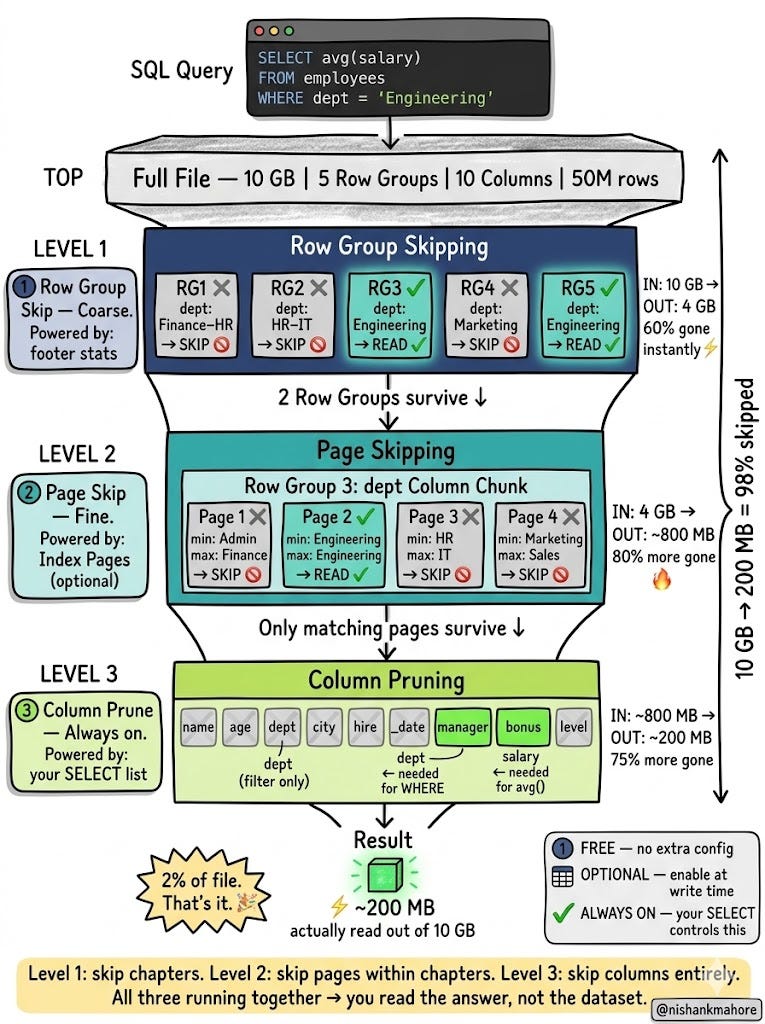
Three Levels of Skipping — Why Parquet Is So Fast
Most people think Parquet is fast because of one thing — column storage. That’s not the whole story. Parquet has three independent ways of skipping data it doesn’t need, and they compound on top of each other.
Level 1 — Skip entire Row Groups (powered by footer min/max stats)
The footer stores the min and max value for every column in every Row Group. If your filter is WHERE dept = 'Engineering'and a Row Group only has dept values between ‘Finance’ and ‘HR’, the engine knows — without opening the Row Group — that ‘Engineering’ can’t be in there. Skipped. Zero bytes read.
This is coarse but powerful. Can eliminate 70–90% of the file instantly.
Level 2 — Skip individual Pages (powered by Index Pages)
Inside a surviving Row Group, the optional Index Page stores min/max per individual Data Page. Even within a Row Group that passed the filter, individual pages that can’t match are skipped. The engine jumps directly to the right pages using byte offsets from the Index Page.
This is finer-grained and requires Index Pages to be written (not the default everywhere — check your tool).
Level 3 — Skip entire columns (powered by your SELECT list)
This is always on. If your query only touches 2 of 50 columns, the other 48 are never opened. The engine knows their byte addresses from the footer, and simply doesn’t seek to them.
Together: a 10 GB file might result in reading just 200 MB — 2% of the data.
How Writing Works (Briefly)
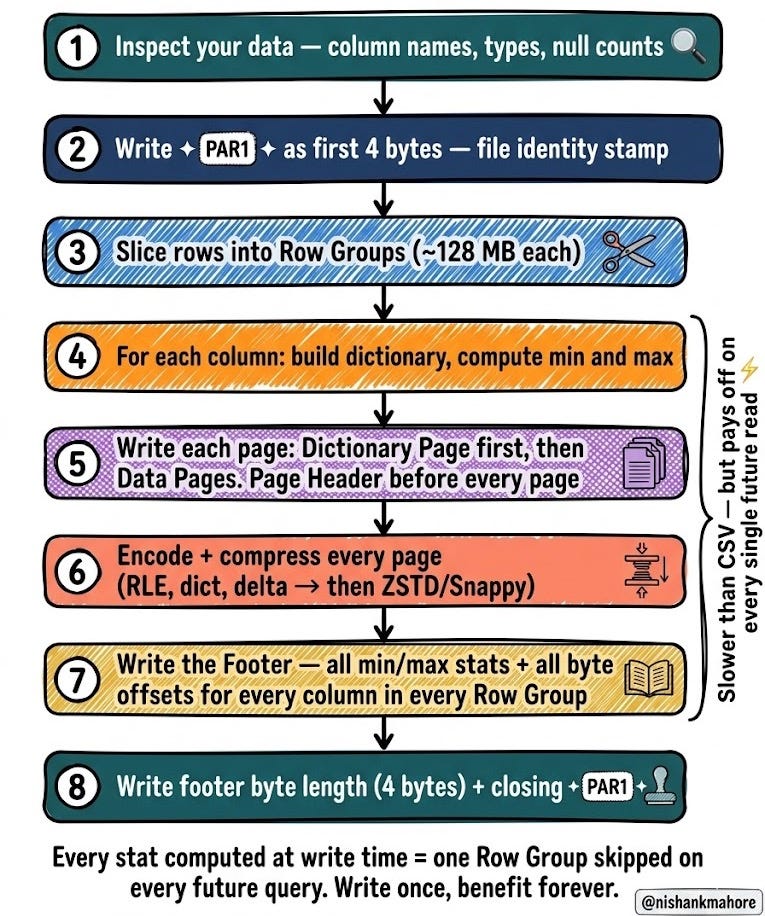
When you call df.write.parquet(path), here’s what actually happens:
1. Writer looks at your data — column names, types, nulls.
2. Writes PAR1 as the first 4 bytes.
3. Splits rows into Row Groups (default ~128 MB each).
4. For each Row Group and each column: builds the dictionary, computes min/max, writes pages one by one — Dictionary Page first, then Data Pages.
5. Each page gets a Page Header written before its data bytes.
6. After all pages, records the byte offsets, min/max, sizes into the Column Chunk metadata.
7. After all Row Groups, writes the full Footer with all collected metadata.
8. Writes the footer byte length + closing PAR1.
This is why writes are slower than CSV. You’re doing a lot of work upfront — computing statistics, building dictionaries, organising everything. But every read for the rest of that file’s life benefits from all that work.
Real World: Spark + Parquet = The Power Combo
Here’s a real example. You have 600 GB of e-commerce orders in Parquet. You run:
sql
SELECT avg(order_value)
FROM orders
WHERE country = 'India'
What Spark does:
Reads the footer — 30 KB. Checks all Row Groups’ country stats.
Eliminates Row Groups where country min/max can’t contain ‘India’. Maybe 70% of Row Groups gone.
Only reads
countryandorder_valuecolumn chunks — 2 out of maybe 20 columns.Those columns are dictionary-encoded (country names repeat a lot) and ZSTD-compressed.
Result: Spark reads about 8 GB instead of 600 GB. That’s a 75× reduction. Real production pipelines routinely see numbers like this. Every byte unread is money unspent on cloud compute.
The Honest Cons — When Not to Use Parquet
Parquet is great. But not always the right tool.
You can’t read it with your eyes. It’s binary — open it in a text editor and you see garbage. You need tools like DuckDB or PyArrow just to peek inside. Painful during debugging.
Writes are slow. Building dictionaries, computing stats, encoding, compressing — all takes time. For real-time streaming ingestion from Kafka, use Avro instead. Parquet is for batch writes.
Small files hurt, not help. A 5 MB Parquet file is often worse than a 5 MB CSV. The overhead of footer parsing, metadata, and binary decoding adds up. Files should be 128 MB to 1 GB for Parquet to shine.
Schema evolution is limited. Adding columns is fine. Renaming or changing column types? Dangerous — old files and new files may become incompatible. Avro handles schema changes much more gracefully.
Single row lookups are terrible. If you need WHERE user_id = 12345, Parquet still decompresses whole pages to find one row. Use a key-value store or row-oriented database for that.
Written by @nishankmahore — for every engineer who ever waited 20 minutes for a CSV to load.